

Front
Connect Front as an access review source using OAuth or an API token so Probo can list your Front company's teammates and their admin status.
Probo reads your Front company’s teammates through the Front Core API so you can review who has access. Connecting with OAuth is the recommended method and avoids creating and copying a token. A company API token is also available if you would rather not authorize an OAuth connection.
Prerequisites
Section titled “Prerequisites”- Probo organization administrator access
- Front company administrator access, which is what Front requires to authorize an OAuth app or create an API token
Collected Fields
Section titled “Collected Fields”| Probo field | Front field | Notes |
|---|---|---|
| Name | first_name, last_name | Joined into one display name. Falls back to username when both are empty, as on a pending invitation |
email | ||
| Role | is_admin | Displayed as Admin or Teammate |
| Admin | is_admin | Flagged as administrator when is_admin is true |
| Status | is_blocked | Front leaves blocked teammates out of the list, so every listed teammate is reported as active |
| MFA | Not supported | |
| Last login | Not supported | |
| External ID | id | The teammate’s Front ID; stable identifier used to track the account across reviews |
| Created at | Not supported |
Front lists a teammate as soon as they are invited, before they accept. A pending invitation therefore appears in your campaign as an active teammate, named after its Front username.
If Front lists an automation as a teammate (a type of rule, macro, integration, application, api, ai, csat, smart_csat, or bulk_reply rather than user), Probo reports it as a service account.
Connect Front
Section titled “Connect Front”Option A: Connect with Front (recommended)
Section titled “Option A: Connect with Front (recommended)”- In Probo, go to Settings > Connectors and click Add more to open the Marketplace.
- Find Front and open it. If Probo asks how to connect, choose OAuth.
- Enter a Name for the connection (e.g.
main) and click Connect. - Sign in to Front as a company administrator and click Authorize.
- Go to Access Review > Sources, click Add sources, tick Front, and click Add.
Option B: API Token
Section titled “Option B: API Token”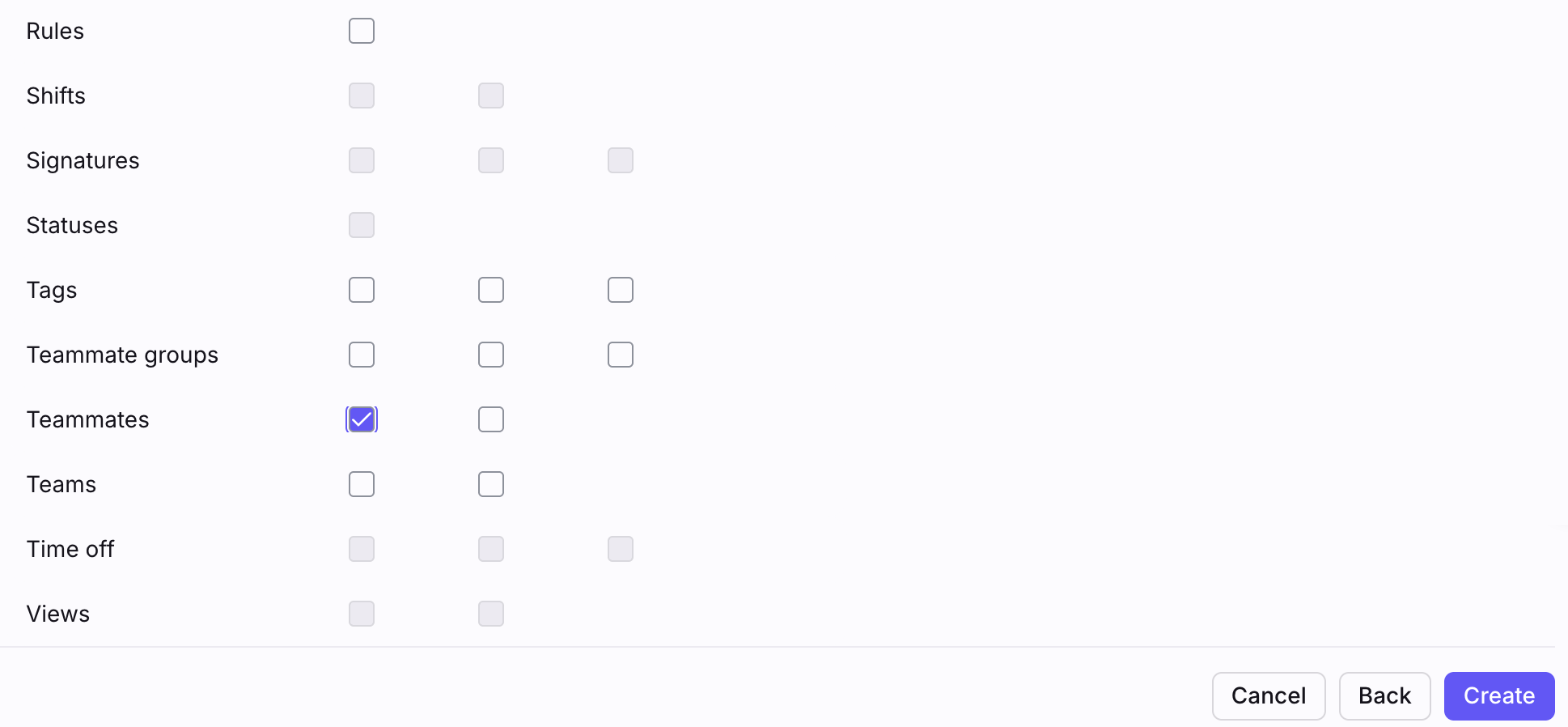
- In Front, open Settings, switch to the Company settings, go to Developers, and open the API tokens tab.
- Click Create API token and, under Token details, name it (e.g.
Probo Access Review). - Under Feature access, tick Access resources.
- Under Namespace access, tick Global resources.
- Under Resource permissions, tick Read on the Teammates row. Leave every other permission unticked.
- Click Create, then copy the token from the Copy your API token dialog. Front shows the token only once.
- In Probo, go to Settings > Connectors and click Add more to open the Marketplace.
- Find Front and open it. If Probo asks how to connect, choose API key.
- Enter a Name for the connection (e.g.
main), paste the token into API key, and click Connect. - Go to Access Review > Sources, click Add sources, tick Front, and click Add.
Probo names the source after your Front company and pulls its teammates into your campaigns.
Troubleshooting
Section titled “Troubleshooting”- An API token connection shows Disconnected. Front rejected the token: it was deleted or copied incompletely. Front does not show an existing token again, so create a new one.
- An API token connection shows Not authorized. Front accepted the token but refused the teammates endpoint, because the token has no Read permission on Teammates. Create a token with the Global resources namespace and Teammates set to Read.
- Replacing an API token. Delete the source in Access Review > Sources, disconnect the connector in Settings > Connectors, and connect again with the new token.
- An OAuth connection asks to reconnect. Front OAuth authorizations expire after six months unless renewed, and an administrator can revoke one earlier. Click Reconnect on the connector in Settings > Connectors and authorize again.
- A teammate who never joined appears. Front lists invited teammates before they accept. Withdraw the invitation in Front if the person should not have access; the next campaign picks up the change, and a campaign already under review keeps the entries it snapshotted.
- A blocked teammate is missing. Front omits blocked teammates from its teammate list, and a blocked teammate cannot sign in.